Most AI worksheet tools work like this: you type a prompt, something appears, and then you spend twenty minutes fixing it. The grammar items are too easy. The vocabulary doesn't match the topic. The reading passage is three levels above your class. You edit, regenerate, edit again. What started as a time-saver becomes a different kind of work.
This is the edit-after model. It generates first and asks questions later. The problem is structural: the AI cannot know what you want until after it has already guessed. Editing becomes damage control rather than refinement.
There is a better approach. Configure everything before generation, and the output matches your intent from the first attempt. This is what config-first worksheet generation means in practice.
Why the Edit-After Model Fails Teachers
When a general-purpose AI tool generates a worksheet from a short prompt, it is making dozens of silent decisions on your behalf. What CEFR level is the vocabulary calibrated to? Which exercise types are appropriate for that grammar structure? How many items should each section contain? Are the distractors drawn from a meaningful pool, or invented at random?
You find out the answers only after generation. If any of those silent decisions were wrong, you are editing. And because the output is usually a wall of formatted text, editing means either re-prompting (and hoping the next attempt is better) or opening a document and doing it manually.
The deeper issue is that short prompts cannot carry enough information. "Make a B2 grammar worksheet on the passive voice" leaves most decisions unspecified. The AI fills the gaps with defaults, and those defaults rarely match your class.
Config-first generation inverts this. Every decision is surfaced before generation: which grammar structures, which exercise types, how many items per section, what CEFR level, what topic, which components to include. The AI generates from a precise specification, not a guess.
How Config-First Works Across Six Composers
The principle is the same across all six composers, but the implementation reflects what each domain actually requires from a pedagogical standpoint.
Grammar: Curriculum Tags and the Compatibility Matrix
Grammar worksheets fail most often when the exercise types do not suit the structure being tested. Gap fill works well for verb forms. Sentence transformation suits conditionals and reported speech. Error correction is poorly matched to articles at A1. A generic tool cannot know this. A config-first tool encodes it.
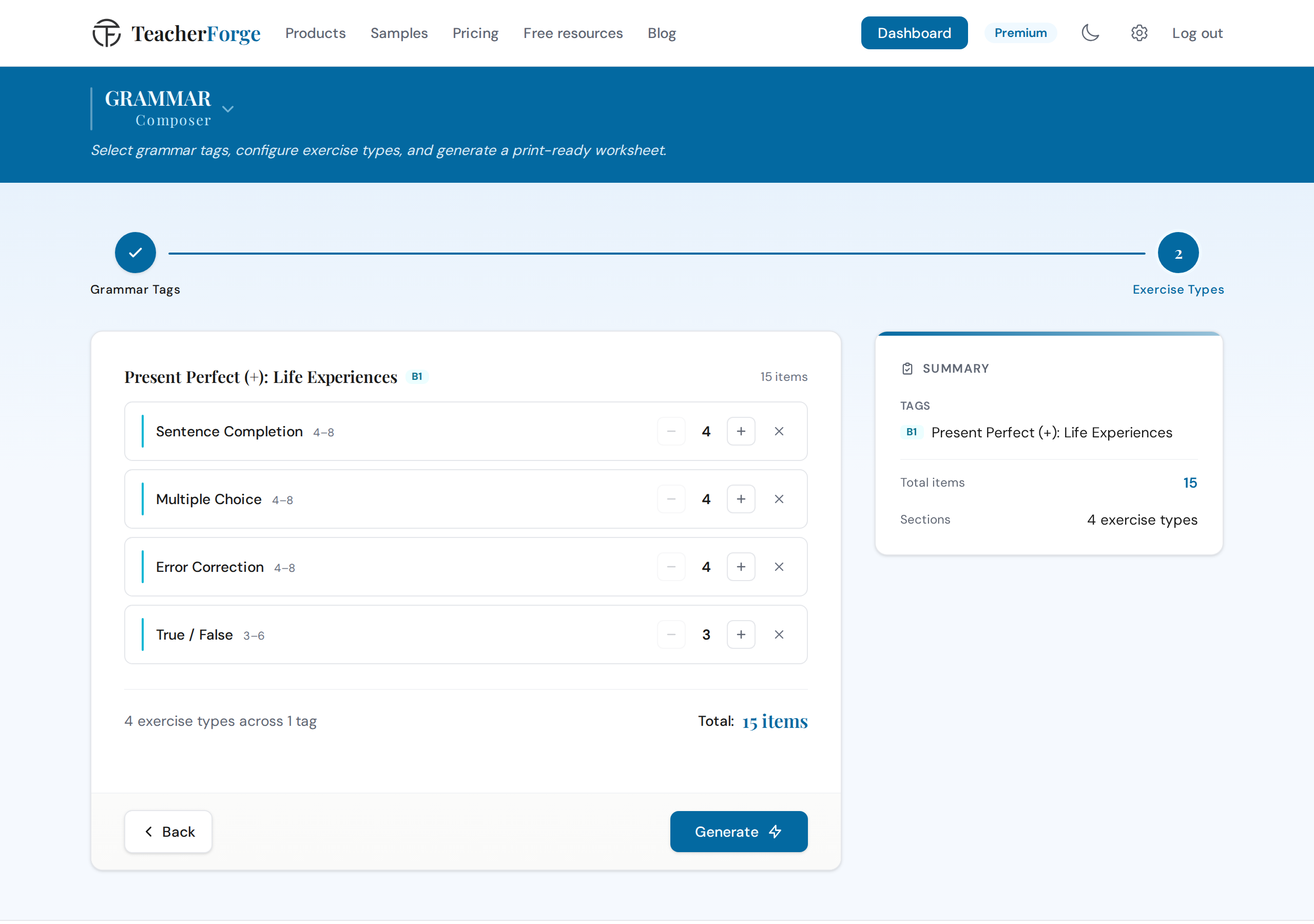
In the Grammar Composer, teachers select up to 3 tags from a 300-point CEFR curriculum. Each tag represents a specific grammar structure at a specific level, with a human-readable label, a rule summary, and an example sentence. Once tags are selected, a compatibility matrix determines which exercise types are valid for each tag. You only ever see exercise types that actually work with your chosen structures.
Item counts are controlled by a slider whose range is calculated dynamically from your tag selection. If you select two tags, a Focus toggle lets you weight one tag more heavily, giving it roughly a 5:3 share of the total items. The worksheet is shaped by your decisions, not by defaults.
For teachers who want to move quickly, the auto-distribution assigns exercise types and item counts automatically. For those who want more control, every count is adjustable with +/- steppers, and exercise types can be added or removed within the compatible set.
Vocabulary: Confirm Every Word Before Exercises Are Built
Vocabulary worksheets depend entirely on the quality of the word list. If the words are wrong for the level, or the distractors are random, the exercises lose their diagnostic value.
The Vocabulary Composer offers three entry paths. Teachers can paste their own words (8 to 30), browse 528 pre-curated subtopics across 11 domains filtered by CEFR level, or paste any text and let the system extract key vocabulary automatically. Whichever path you take, every word passes through a review step before a single exercise is built.
The ESL vocabulary worksheets page shows that review step in context, with part of speech, definition and CEFR level attached to each word before anything is generated.
At the review step, each word is enriched with its part of speech, CEFR level, and a level-adapted definition. If a word has multiple parts of speech, you choose which meaning to use. You can remove words that do not fit or add replacements. Only confirmed words proceed to the exercise builder.
This matters for distractor quality. In gap fill, the box's extra words are drawn from your confirmed word list; in multiple choice, three wrong definitions of the same kind are written for each word. The result is a coherent set of plausible alternatives that actually test whether students can distinguish between the words they have studied.
Reading: Review the Full Passage Before Questions Are Written
One of the most common complaints about AI-generated reading worksheets is that the questions do not match the passage. The inference items ask about information that is not there. The vocabulary questions target words that were not in the text. This happens because questions and passage are generated together, without any human check in between.
The Reading Comprehension Composer separates these into two distinct steps. First, the passage is generated or pasted. Then you read it in full before a single question is configured.
For generated passages, you choose the CEFR level, a topic (with a specificity prompt that encourages detail: "A day at a Japanese fish market" rather than "Japan"), one of 7 text styles (article, story, email, blog post, letter, dialogue, report), and a length band. For pasted passages, the system automatically detects the CEFR level and extracts a topic, both of which you can override.
After reviewing the passage, you configure exercises from 8 types, with level-gating applied throughout. True/False questions in reading are three-way: True, False, or Not Given, matching the format students encounter in Cambridge and IELTS assessments. Matching headings requires paragraph structure, so it is not available for dialogue, email, or letter styles. These constraints are not arbitrary; they reflect what the exercise type actually tests.
Writing: Five Components, Not Just a Prompt
A writing prompt tells students what to write. It does not tell them how to structure their response, which phrases are appropriate at their level, or what the teacher will be assessing. A complete writing task includes all of these.
The Writing Task Composer generates five components in a single step: a scenario-based prompt (specifying who, what, why, and where), a planning checklist tailored to the task type, a useful language box with CEFR-calibrated phrases grouped by function, an assessment rubric with level-appropriate band descriptors, and a model answer within the word limit.
Teachers choose from 8 task types (essay, informal letter, formal letter, report, review, article, story, proposal), with availability gated by level. Cambridge Standard mode sets the task as the exam does: a model answer and the four Generic criteria (Content, Communicative Achievement, Organisation, Language), with no planning checklist or useful language box. Custom mode lets you toggle the checklist, the language box and the model answer, and choose the criteria style. The word limit is set by the level and task type in both modes.
The configuration determines the output. A B2 formal letter with Cambridge Standard mode produces a different package from a B1 story in Custom mode with the model answer toggled off. You decide before generation; the AI executes the specification.
Listening: Browse, Preview, Then Configure
Listening exercises present a different challenge. The audio and script must exist before exercises can be written. A config-first approach here means browsing a curated library, previewing the full script and audio, and only then configuring exercises.
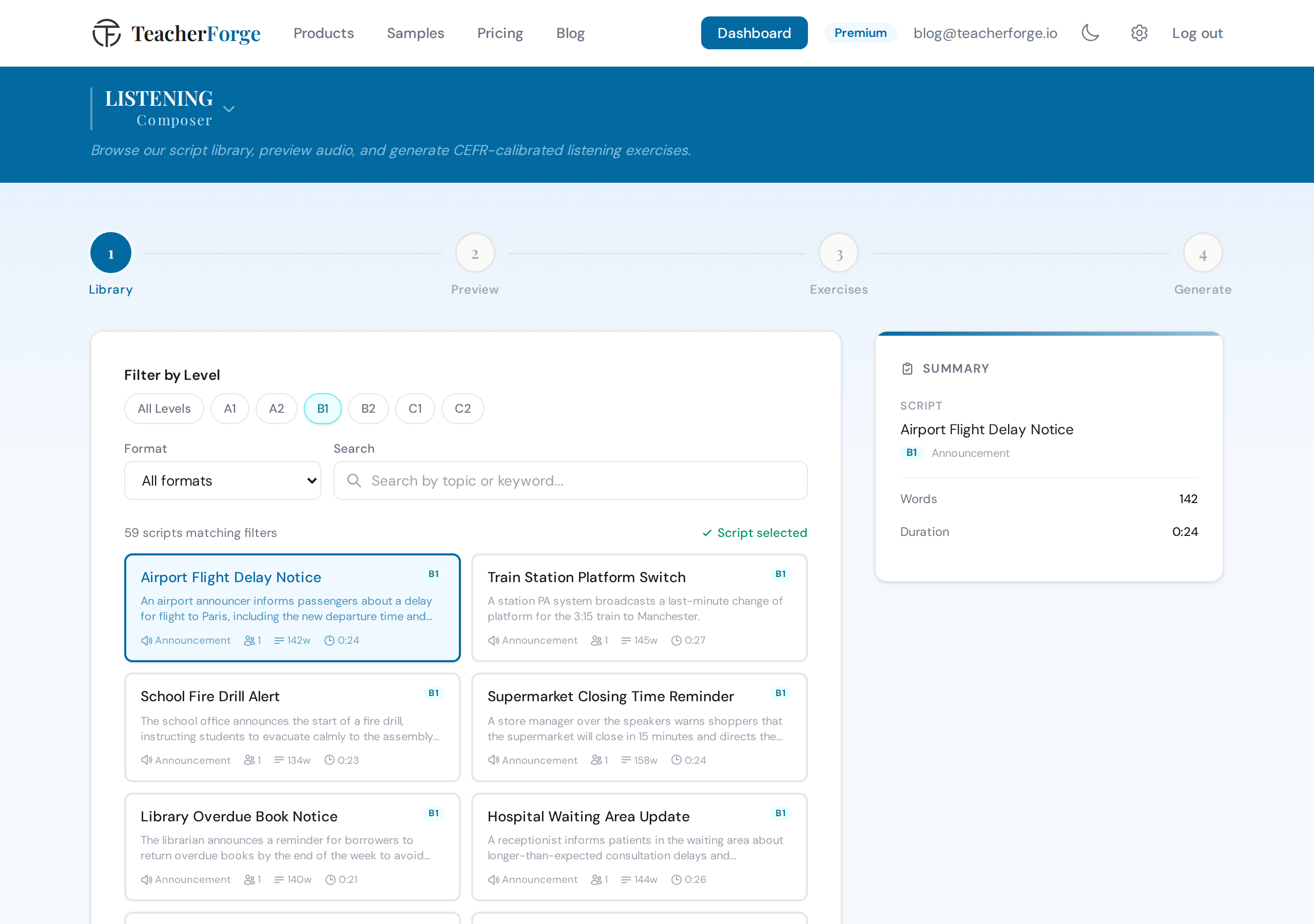
The Listening Composer lets teachers filter by CEFR level and one of 7 formats (conversation, interview, announcement, lecture, monologue, news report, phone call), then search by keyword. Each result shows the format, speaker count, word count, and audio duration.
Before committing, you can play the audio at adjustable speeds (0.5x to 1.25x) and read the full transcript. Once you confirm the script, you configure exercises from 7 types, with level-gating applied. The download includes the student worksheet, answer key, transcript PDF, and audio MP3 in a single ZIP.
If the library does not have what you need, you can submit a topic request directly from the browser. Requests guide what gets added next.
Exam: Configure Each Domain Independently
Building a multi-skill exam with a generic tool means stitching together separate generations and hoping the formatting holds. Config-first exam building means selecting domains, setting marks per question, configuring each section with the same depth as the standalone products, and reviewing a complete mark summary before generating anything.
The Exam Composer starts with domain selection (Grammar, Vocabulary, Reading, Writing, Listening) and drag-to-reorder controls that determine the order domains appear in the PDF. Each domain then has its own configuration tab, using the same interface as the standalone composer for that skill.
Five presets are available, including Cambridge B2 First and Cambridge C1 Advanced configurations validated against real exam mark distributions. Grammar Focus, Grammar & Vocabulary Quiz and Comprehensive Assessment set their exercises themselves: 10 one-mark questions for each grammar point the teacher picks, plus, for Grammar & Vocabulary Quiz, 10 vocabulary words from a topic, and for Comprehensive Assessment, those 10 words and one reading text in the style and on the topic the teacher picks. The two Cambridge presets fix every part of the paper and have no grammar section: the structures tested come from the level, as in the real exam. A live sidebar shows the running total marks throughout the wizard.
There are six exam-only exercise types, each modelled on a part of the Cambridge Reading and Use of English paper: word formation, gapped text, multiple-choice cloze, open cloze and key word transformation from B2, and cross-text multiple matching at C1.
Presets: Speed Without Sacrificing Control
Config-first does not mean slow. Across all six products, presets offer curated starting points that reflect real exam formats and classroom scenarios.
Reading has five presets, including IELTS Style (22 items) and Cambridge Style (16 items). Listening has six, including IELTS Style and Cambridge Style. The Exam Composer has five presets covering everything from a 10-minute Grammar Focus on one grammar point to a full Cambridge B2 First configuration.
Every preset is a starting point, not a constraint. After applying a preset, you can adjust exercise type counts, add or remove sections, and change marks per question. The exceptions are the exam presets that set a whole paper: the two Cambridge papers, Grammar Focus and Grammar & Vocabulary Quiz keep their parts and marks until you switch to a custom exam. The preset gets you to a sensible default in one click; the configuration tools let you refine from there.
How to Create This with TeacherForge
The config-first approach is built into every step of every composer. Here is what the workflow looks like in practice.
- Choose your product based on the skill you are targeting.
- Work through the wizard steps: select level, topic or tags, text style or script, exercise types, and item counts.
- Where applicable, review the generated content (passage, script) before configuring exercises.
- On the final review screen, confirm your configuration and generate.
- After generation, adjust layout settings (font and size, plus color on a worksheet) in the preview at no extra cost.
- Download the PDF and DOCX bundle. The student worksheet and answer key are always paired.
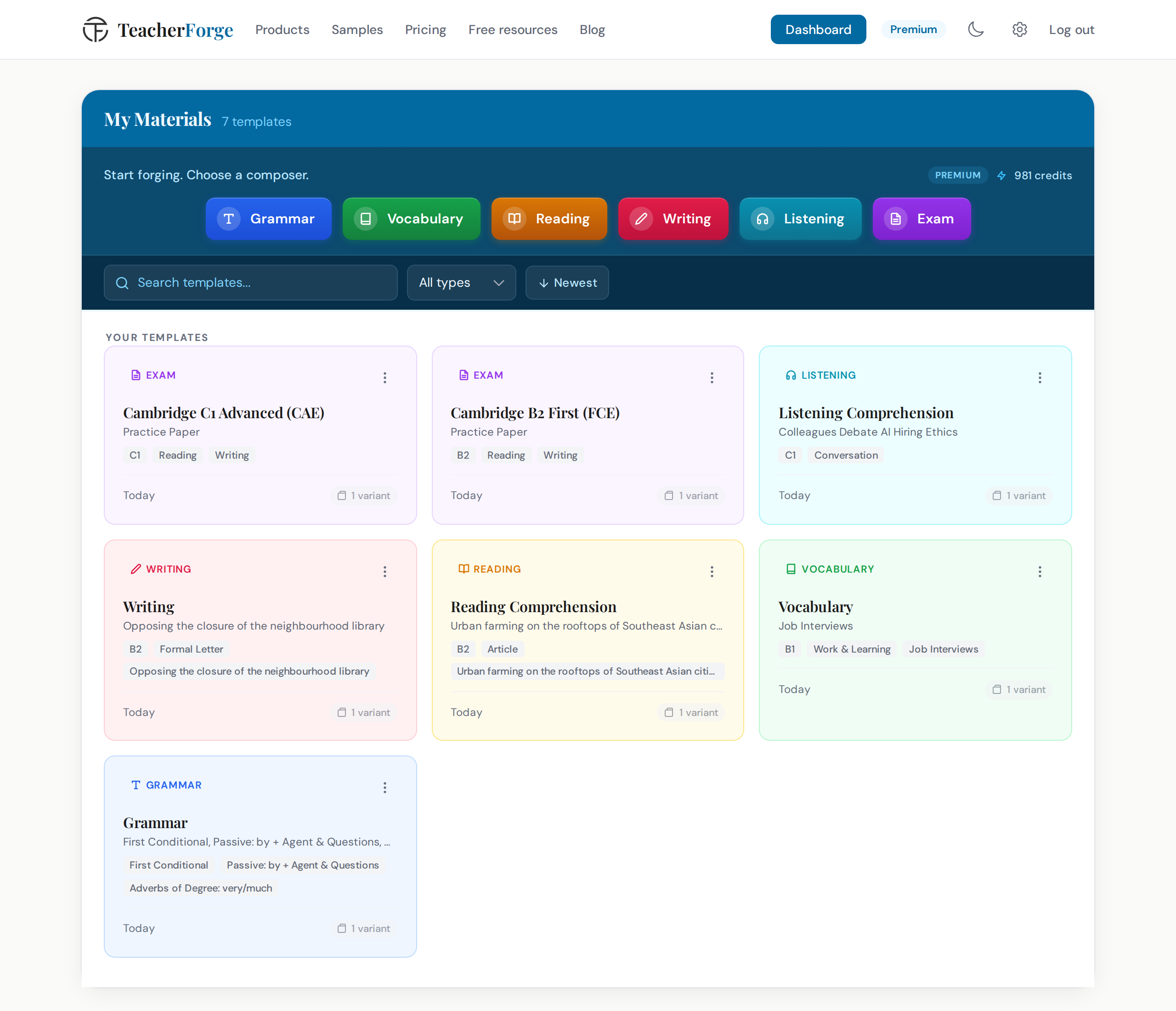
Every generation automatically becomes a reusable template on your dashboard. There is no save step. The template card shows the product type, CEFR level, topic or tags, and how many variants you have generated. When you need a fresh set of exercises with the same configuration, choose "Regenerate" from the card's menu and the wizard reopens pre-filled. You tweak if you want to, or generate directly.
The DOCX export exists as an escape valve, not the primary workflow. When a specific sentence needs adjusting for a particular class, you open the document and change it. But because the configuration was precise before generation, most outputs do not need editing. The goal is a worksheet you can print and use.
The Template System Is Config-First by Design
The reusability of every generation is a direct consequence of how config-first works. Because the configuration is rich and precise, it functions as a complete specification: CEFR level, grammar tags, exercise types, item counts, topic, text style, word limit, components. That specification is the template.
Reusing it does not mean reprinting the same worksheet. It means running the same specification through the AI again to get fresh content with the same pedagogical shape. A B1 reading worksheet on environmental topics with MCQ, True/False/Not Given, and Short Answer will produce a different passage and different questions each time, but always at the right level, with the right exercise types, and the right item counts.
This is what makes the template system genuinely useful rather than just a filing cabinet. The configuration does the work.
Where to Go Next
Each composer has a dedicated product page with more detail on its exercise types and configuration options:
- Grammar Composer
- Vocabulary Composer
- Reading Comprehension Composer
- Writing Task Composer
- Listening Exercise Composer
- Exam Composer
The ESL worksheet generator page brings the six together on one screen if you want to compare what each produces before choosing.
If you want to see the full range of exercise types available for grammar worksheets, the article Grammar Worksheets Beyond Gap Fill covers all 9 types with classroom examples. For vocabulary, Vocabulary Worksheets That Test More Than Definitions walks through how each of the 5 exercise types functions differently.
To build your first worksheet, go to whichever composer matches your next lesson and work through the steps. The configuration is the work. The generation is the result.