Building a multi-skill English exam is one of those tasks that looks straightforward on a Monday and somehow consumes your entire weekend. You need a reading passage, a grammar section, a vocabulary task, a writing prompt, and possibly a listening component. Each one needs its own exercises, answer key, and mark allocation. Then they all need to sit at the same CEFR level, add up to a sensible total, and look like a coherent document rather than five worksheets stapled together.
Most of us have been there: the grammar section came from one textbook, the reading passage from an old Cambridge paper, the writing prompt from a course website. The result is what teachers sometimes call a Frankenstein test: technically functional, but inconsistent in difficulty, style, and expectation. This article is about how to avoid that, and what a well-structured multi-skill exam actually looks like.
What Goes Into a Well-Structured Multi-Skill Exam
Before thinking about tools or shortcuts, it helps to understand the architecture of a good exam. A multi-skill test is not just a collection of exercises. It is a coherent assessment instrument with a clear purpose, consistent level calibration, and a mark scheme that reflects what you actually want to measure.
CEFR Level Consistency
Every section of the exam should target the same CEFR level. This sounds obvious, but it breaks down in practice. A B2 grammar section with a B1 reading passage gives students an uneven experience: they struggle with one section and sail through another, which makes it hard to interpret the results. If you are assessing B2, every domain should be calibrated to B2 descriptors.
The Council of Europe's CEFR descriptors are specific about what learners can do at each level. At B2, for instance, students are expected to understand the main ideas of complex text on both concrete and abstract topics, and to interact with a degree of fluency and spontaneity. Your reading passage should reflect that complexity; your grammar section should test structures that appear at that level; your writing task should require the kind of organisation and range that B2 demands.
Mark Allocation and Weighting
Mark allocation is where many teacher-built exams fall apart. If your grammar section has 30 questions worth 1 mark each and your writing task is worth 5 marks, you are implicitly telling students that grammar matters six times more than writing. That may or may not be what you intend.
A useful starting point is to look at how established exams handle this. Cambridge B2 First (FCE) allocates marks across Use of English, Reading, Writing, Listening, and Speaking in proportions that reflect the relative weight of each skill. The written components alone (Reading and Use of English plus Writing) account for 110 raw marks. CAE, targeting C1, reaches 118 raw marks across the same components.
These numbers are not arbitrary. They reflect decisions about how much each skill should contribute to the final grade. When building your own exam, it is worth making those decisions explicitly rather than letting them happen by accident.
Section Length and Timing
A 90-minute exam with a 60-item grammar section and a 200-word writing task is poorly balanced. Students will rush the writing and have time to spare on grammar. As a rough guide, allow about one minute per objective item (multiple choice, gap fill, true/false) and considerably more for productive tasks: 20–25 minutes for a B1 essay of 120–150 words, 30–40 minutes for a B2 formal letter.
Listening sections add a fixed time constraint because the audio runs at its own pace. A 4-minute audio clip with 10 questions takes roughly 10–12 minutes of exam time once you account for the second listening. Plan for this explicitly.
Exercise Types That Match the Skill
Not every exercise type is appropriate for every skill domain or every level. Some types are level-gated for good pedagogical reasons. Matching headings in reading, for example, requires students to understand paragraph-level structure and main ideas: a skill that only becomes reliable at B1 and above. Asking A2 students to match headings to paragraphs is testing something they have not yet developed, which makes the results hard to interpret.
Similarly, certain exercise types are particularly well-suited to exam contexts. Two types from the Cambridge Reading and Use of English paper deserve special mention.
Word formation gives students a passage with gaps and a root word beside each gap. Students must transform the root word into the correct derived form: adding a prefix, suffix, or changing the part of speech entirely. It tests morphological awareness and is a reliable discriminator at B2 and above. A gap asking for the noun form of develop in context (answer: development) tells you something meaningful about a student's lexical range.
Gapped text removes complete sentences from a reading passage (whole paragraphs at C1 and C2) and asks students to match them back using cohesion clues: pronoun reference, lexical chains, discourse markers. It is a B2+ task that tests reading at the level of text organisation rather than individual sentences. Students who can do this well have genuinely internalised how English texts hold together.
Both of these types are harder to write by hand than they look. A good word formation passage needs gaps that test a range of derivational processes without being ambiguous. A gapped text passage needs removed sentences that are unambiguously placed, with enough cohesion clues to guide the reader but not so many that the task becomes trivial.
Both are exam-only types, which is why they rarely appear in worksheet tools. The ESL exam maker includes them, and its Cambridge FCE and CAE presets are validated against the real papers' mark totals, so the weighting is set before you start rather than reconciled afterwards.
Practical Steps for Building a Balanced Exam
Here is a process that works for building a multi-skill exam from scratch, whether you are doing it by hand or with a tool.
-
Fix your CEFR level first. Every decision that follows depends on this. Write it at the top of your planning document and check every section against it before you finalise.
-
Decide your domains. Which skills are you assessing? Grammar and vocabulary only? All five skills? Be deliberate. If you are not assessing listening, say so in the exam instructions so students know what to expect.
-
Set your total mark and time limit. Work backwards from there. If the exam is 50 marks in 50 minutes, you have roughly one mark per minute for objective items, with longer allocations for writing.
-
Allocate marks by domain before building exercises. Decide that grammar is worth 15 marks, vocabulary 10, reading 15, and writing 10, before you write a single question. This forces you to be explicit about weighting.
-
Choose exercise types that match the level and the domain. Use the level-gating rules above as a guide. At A2, stick to multiple choice, true/false, gap fill, and sentence completion. At B2+, you can introduce gapped text, matching headings, and word formation.
-
Write or source a reading passage at the right level. For B1, aim for 220–320 words on a concrete but engaging topic. For B2, 350–500 words on a more abstract subject. Check that the vocabulary and sentence complexity genuinely match the level.
-
Build your answer key as you go. Do not leave it until the end. Writing the answer key as you create each section catches ambiguous questions before students see them.
-
Do a final mark audit. Count every mark in every section. Check that the total matches your target and that the weighting across domains reflects your intentions.
-
Format everything consistently. Section headings, numbering, instructions, and answer spaces should follow the same conventions throughout. Inconsistent formatting confuses students and makes marking harder.
-
Pilot with a colleague if possible. Ask another teacher to sit the exam (or at least read through it) and check for ambiguity, timing, and level consistency. A fresh pair of eyes catches things you have stopped seeing.
How to Create This with TeacherForge
The Exam Composer in TeacherForge is built specifically for this problem. It handles all five skill domains in a single workflow, so you do not need to build each section separately and then try to stitch them together.
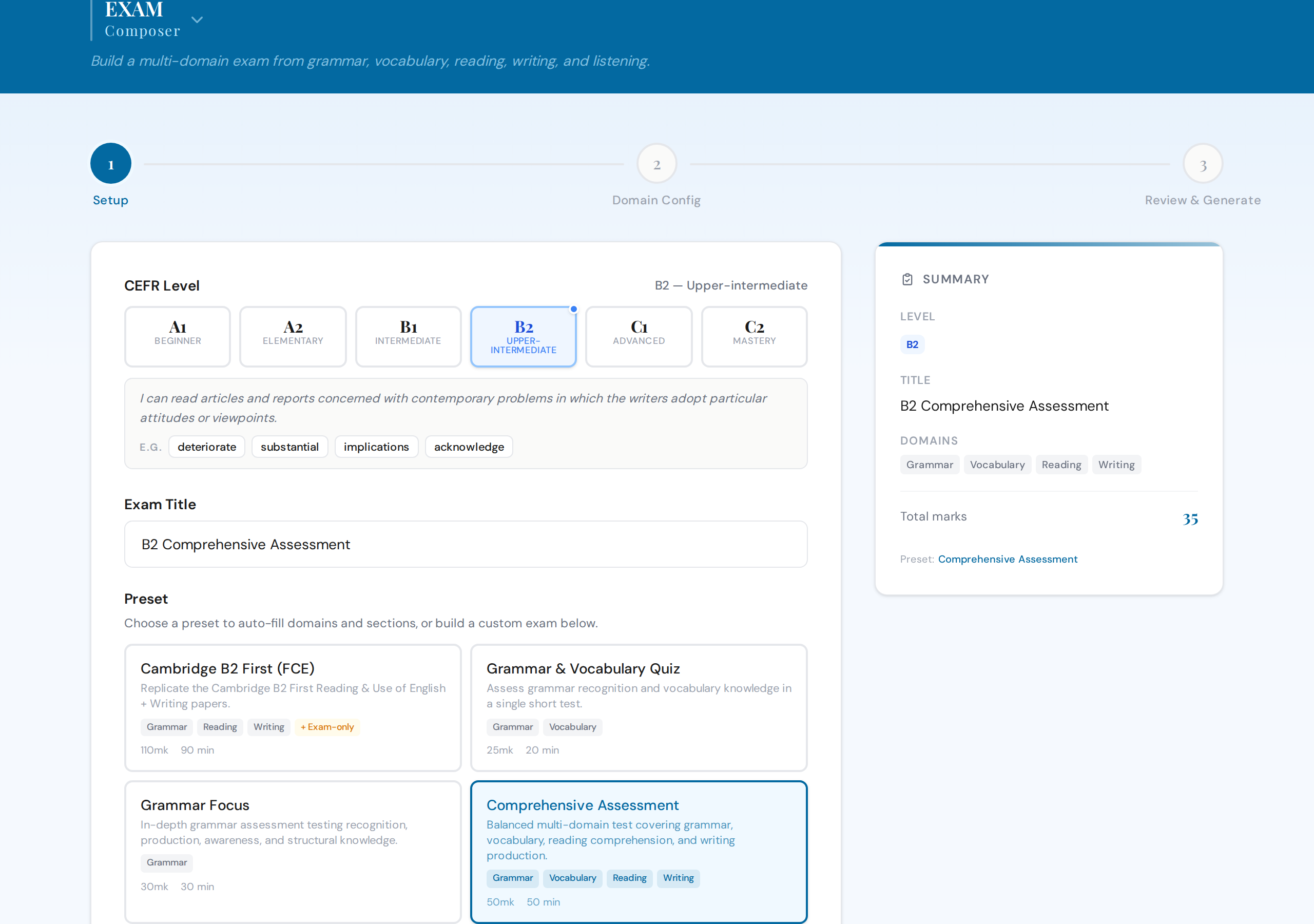
You start by selecting your CEFR level and giving the exam a title. If you are targeting a Cambridge-style assessment, five presets are available: Cambridge B2 First (FCE, 110 marks, 155 minutes), Cambridge C1 Advanced (CAE, 118 marks, 180 minutes), Grammar and Vocabulary Quiz (25 marks, 20 minutes), Grammar Focus (30 marks, 30 minutes), and Comprehensive Assessment (50 marks, 50 minutes). The Cambridge presets are calibrated to the actual raw mark structures of those exams, not approximations.
Once you have selected your domains (Grammar, Vocabulary, Reading, Writing, Listening, or any combination), each domain opens its own configuration tab. The Grammar tab uses the same tag-based composer as the standalone Grammar product: you select up to 3 grammar points from a 300-tag curriculum and the system distributes items across compatible exercise types. The Reading tab generates one text from its own topic, text style and length, and you configure its exercises from the level-gated types. The Writing tab sets one task, with the same Cambridge Standard or Custom mode as the Writing Composer: Cambridge Standard gives the exam's four criteria and a model answer, and Custom adds a planning checklist, a useful language box or task-specific criteria. The Listening tab connects to the script library so you can browse, preview, and select a script with audio included.
Six exercise types are only available inside the Exam Composer: five from B2, and Cross-text Multiple Matching at C1 only. Word Formation generates a passage with gaps where students transform root words into the correct derived form, modelled on Cambridge Reading and Use of English Part 3. Gapped Text removes sentences from a passage (whole paragraphs at C1 and C2) and asks students to match them back, modelled on B2 First Reading Part 6 and C1 Advanced Reading Part 7. The other four are Multiple-choice Cloze, Open Cloze, Key Word Transformation and Cross-text Multiple Matching. None of them is available in the standalone products.
You can drag domains into the order you want them to appear in the PDF. A live sidebar shows the running total marks as you configure each section, so you can see immediately if your weighting is drifting. Marks per question are adjustable (1–3 marks), and the Cambridge presets lock every mark to the official scheme (key word transformation is 2 marks in FCE and CAE, for instance).
Generation runs all domains in parallel. The output is a single unified paper that opens on a cover page (title, level, marks, time and instructions), numbers its questions continuously across all sections and ends on an answer sheet, with a combined answer key as its own document. If you included a listening section, the MP3 audio file is bundled in the download ZIP alongside the exam paper.
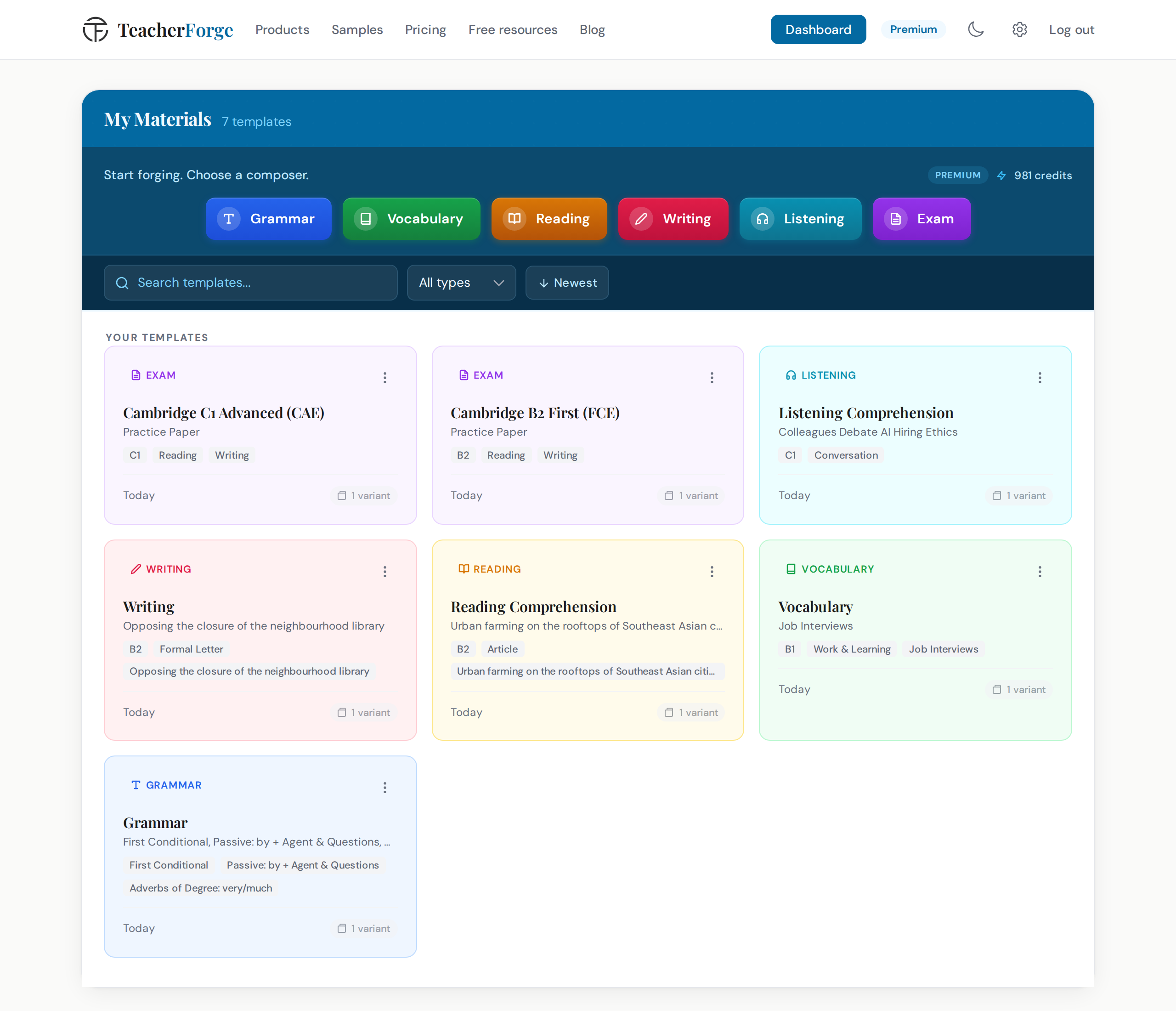
Every exam you generate automatically becomes a reusable template on the dashboard. From there, you can choose "Regenerate" from its card's menu to get a fresh exam with the same configuration: same domains, same exercise types, same mark allocation, but new passages, questions, and sentences. There is no setup to repeat.
You can adjust the layout after generation at no extra cost: choose the font (Arial, Times New Roman or Verdana) and the text size (Small, Normal or Large). The download always reflects your latest settings.
For teachers on Pro or Premium plans, your school logo renders above the exam title on the cover page. Free-tier output includes a small TeacherForge footer on every page.
Further Reading
If you want to go deeper on any individual skill domain before building your full exam, these articles cover each composer in detail:
- Grammar Worksheets Beyond Gap Fill: 9 Exercise Types That Test What Students Actually Know
- Vocabulary Worksheets That Test More Than Definitions: 5 Exercise Types Every Teacher Should Use
- How to Create Reading Comprehension Worksheets That Match Your Students' Level
- How to Create a Complete ESL Writing Task (Not Just a Prompt)
- How to Create Listening Exercises Without a Recording Studio
- How Much Time Do ESL Teachers Spend Creating Materials (and How to Cut It in Half)
Building a multi-skill exam well takes thought. The pedagogy, the level calibration, the mark allocation: none of that can be automated away entirely. But the mechanical work, sourcing passages, writing questions, formatting sections, compiling answer keys, can be. That is what TeacherForge is for.
Try building your first multi-skill exam with the Exam Composer →